
 Lizhi Yang
b0d751101b
Lizhi Yang
b0d751101b
|
4 months ago | |
|---|---|---|
| src/televuer | 4 months ago | |
| test | 5 months ago | |
| .gitignore | 5 months ago | |
| LICENSE | 9 months ago | |
| README.md | 5 months ago | |
| pyproject.toml | 9 months ago | |
README.md
TeleVuer
The TeleVuer library is a specialized version of the Vuer library, designed to enable XR device-based teleoperation of Unitree Robotics robots. This library acts as a wrapper for Vuer, providing additional adaptations specifically tailored for Unitree Robotics. By integrating XR device capabilities, such as hand tracking and controller tracking, TeleVuer facilitates seamless interaction and control of robotic systems in immersive environments.
Currently, this module serves as a core component of the xr_teleoperate library, offering advanced functionality for teleoperation tasks. It supports various XR devices, including Apple Vision Pro, Meta Quest3, Pico 4 Ultra Enterprise etc., ensuring compatibility and ease of use for robotic teleoperation applications.
Release Note
V3.0 brings updates:
- Added
pass_throughinterface to enable/disable the pass-through mode. - Support
webrtcinterface to enable/disable the webrtc streaming mode. - Use
render_to_xrmethod (adjust fromset_display_image) to send images to XR device.
V2.0 brings updates:
- Image transport is now by reference instead of external shared memory.
- Renamed the get-data function from
get_motion_state_datatoget_tele_data. - Fixed naming errors (
waist→wrist) - Var name align with vuer conventions.
- Streamlined the data structure: removed the nested
TeleStateDataand return everything in the unifiedTeleData. - Added new image-transport interfaces such as
set_display_image.
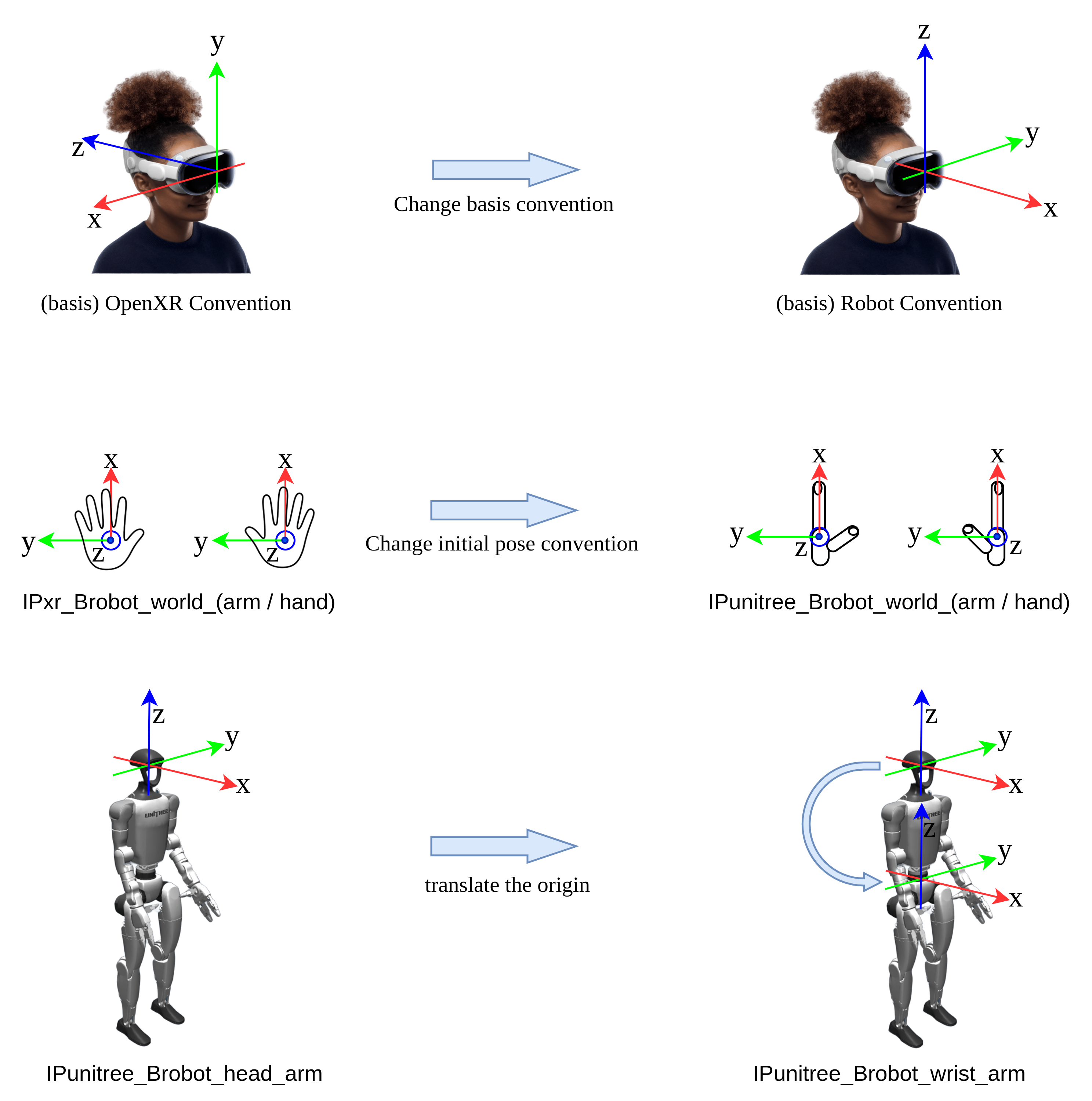
Diagram
Install
cd televuer
pip install -e .
openssl req -x509 -nodes -days 365 -newkey rsa:2048 -keyout key.pem -out cert.pem
Test
python _test_televuer.py
# or
python _test_tv_wrapper.py

# First, use Apple Vision Pro or Pico 4 Ultra Enterprise to connect to the same Wi-Fi network as your computer.
# Next, open safari / pico browser, enter https://host machine's ip:8012/?ws=wss://host machine's ip:8012
# for example, https://192.168.123.2:8012?ws=wss://192.168.123.2:8012
# Use the appropriate method (hand gesture or controller) to click the "pass-through" button in the bottom-left corner of the screen.

# Press Enter in the terminal to launch the program.
Version History
vuer==0.0.32rc7
- Functionality:
- Hand tracking works fine.
- Controller tracking is not supported.
vuer==0.0.35
- Functionality:
- AVP hand tracking works fine.
- PICO hand tracking works fine, but the right eye occasionally goes black for a short time at startup.
vuer==0.0.36rc1 to vuer==0.0.42rc16
- Functionality:
- Hand tracking only shows a flat RGB image (no stereo view).
- PICO hand and controller tracking behave the same, with occasional right-eye blackouts at startup.
- Hand or controller markers are displayed as either black boxes (
vuer==0.0.36rc1) or RGB three-axis color coordinates (vuer==0.0.42rc16).
vuer==0.0.42 to vuer==0.0.45
- Functionality:
- Hand tracking only shows a flat RGB image (no stereo view).
- Unable to retrieve hand tracking data.
- Controller tracking only shows a flat RGB image (no stereo view), but controller data can be retrieved.
vuer==0.0.46 to vuer==0.0.56
- Functionality:
- AVP hand tracking works fine.
- In PICO hand tracking mode:
- Using a hand gesture to click the "Virtual Reality" button causes the screen to stay black and stuck loading.
- Using the controller to click the button works fine.
- In PICO controller tracking mode:
- Using the controller to click the "Virtual Reality" button causes the screen to stay black and stuck loading.
- Using a hand gesture to click the button works fine.
- Hand marker visualization is displayed as RGB three-axis color coordinates.
vuer==0.0.60
-
Recommended Version
-
Functionality:
- Stable functionality with good compatibility.
- Most known issues have been resolved.
- A minor issue: the right eye briefly goes black right after startup.
-
References:
Tested Devices
please refer to our wiki doc XR Device
Notes
- Recommended Version: Use
vuer==0.0.60for the best functionality and stability. - Black Screen Issue: On PICO devices, choose the appropriate interaction method (hand gesture or controller) based on the mode to avoid black screen issues.