
 silencht
f05bf475bd
silencht
f05bf475bd
|
1 year ago | |
|---|---|---|
| assets | 1 year ago | |
| img | 2 years ago | |
| teleop | 1 year ago | |
| .gitignore | 2 years ago | |
| LICENSE | 1 year ago | |
| README.md | 1 year ago | |
| requirements.txt | 2 years ago | |
README.md
📺 Video Demo

0. 📖 Introduction
This repository implements teleoperation of the Unitree humanoid robot using Apple Vision Pro.
Here are the robots that will be supported,
| 🤖 Robot | ⚪ Status |
|---|---|
| G1(29DoF) + Dex3-1 | ✅ Completed |
| G1(23DoF) | ⏱ In Progress |
| H1(Arm 4DoF) | ⏱ In Progress |
| H1_2(Arm 7DoF) + Inspire | ⏱ In Progress |
1. 📦 Prerequisites
We tested our code on Ubuntu 20.04 and Ubuntu 22.04, other operating systems may be configured differently.
For more information, you can refer to Official Documentation and OpenTeleVision.
1.1 🦾 inverse kinematics
conda create -n tv python=3.8
conda activate tv
# If you use `pip install`, Make sure pinocchio version is 3.1.0
conda install pinocchio -c conda-forge
pip install meshcat
pip install casadi
1.2 🕹️ unitree_dds_wrapper
# Install the Python version of the unitree_dds_wrapper.
git clone https://github.com/unitreerobotics/unitree_dds_wrapper.git
cd unitree_dds_wrapper/python
pip install -e .
p.s. This is a temporary version, and it will be replaced with unitree_sdk2_python in the future.
2. 🛠️ TeleVision and Apple Vision Pro configuration
2.1 📥 basic
cd ~
git clone https://github.com/unitreerobotics/avp_teleoperate.git
cd ~/avp_teleoperate
pip install -r requirements.txt
cd act/detr && pip install -e .
2.2 🔌 Local streaming
Apple does not allow WebXR on non-https connections. To test the application locally, we need to create a self-signed certificate and install it on the client. You need a ubuntu machine and a router. Connect the VisionPro and the ubuntu machine to the same router.
- install mkcert: https://github.com/FiloSottile/mkcert
- check local ip address:
ifconfig | grep inet
Suppose the local ip address of the Host machine is 192.168.123.2
p.s. you can use
ifconfigcommand to check your Host machine ip address.
- create certificate:
mkcert -install && mkcert -cert-file cert.pem -key-file key.pem 192.168.123.2 localhost 127.0.0.1
ps. place the generated cert.pem and key.pem files in teleop.
cp cert.pem key.pem ~/avp_teleoperate/teleop/
- open firewall on server:
sudo ufw allow 8012
- install ca-certificates on VisionPro:
mkcert -CAROOT
Copy the rootCA.pem via AirDrop to VisionPro and install it.
Settings > General > About > Certificate Trust Settings. Under "Enable full trust for root certificates", turn on trust for the certificate.
Settings > Apps > Safari > Advanced > Feature Flags > Enable WebXR Related Features.
2.3 🔎 Test environment
This step is to verify that the environment is installed correctly.
-
Download Isaac Gym: https://developer.nvidia.com/isaac-gym/download
Extracting to the current directory, go to the
IsaacGym_Preview_4_Package/isaacgym/pythondirectory and execute the command:pip install -e . -
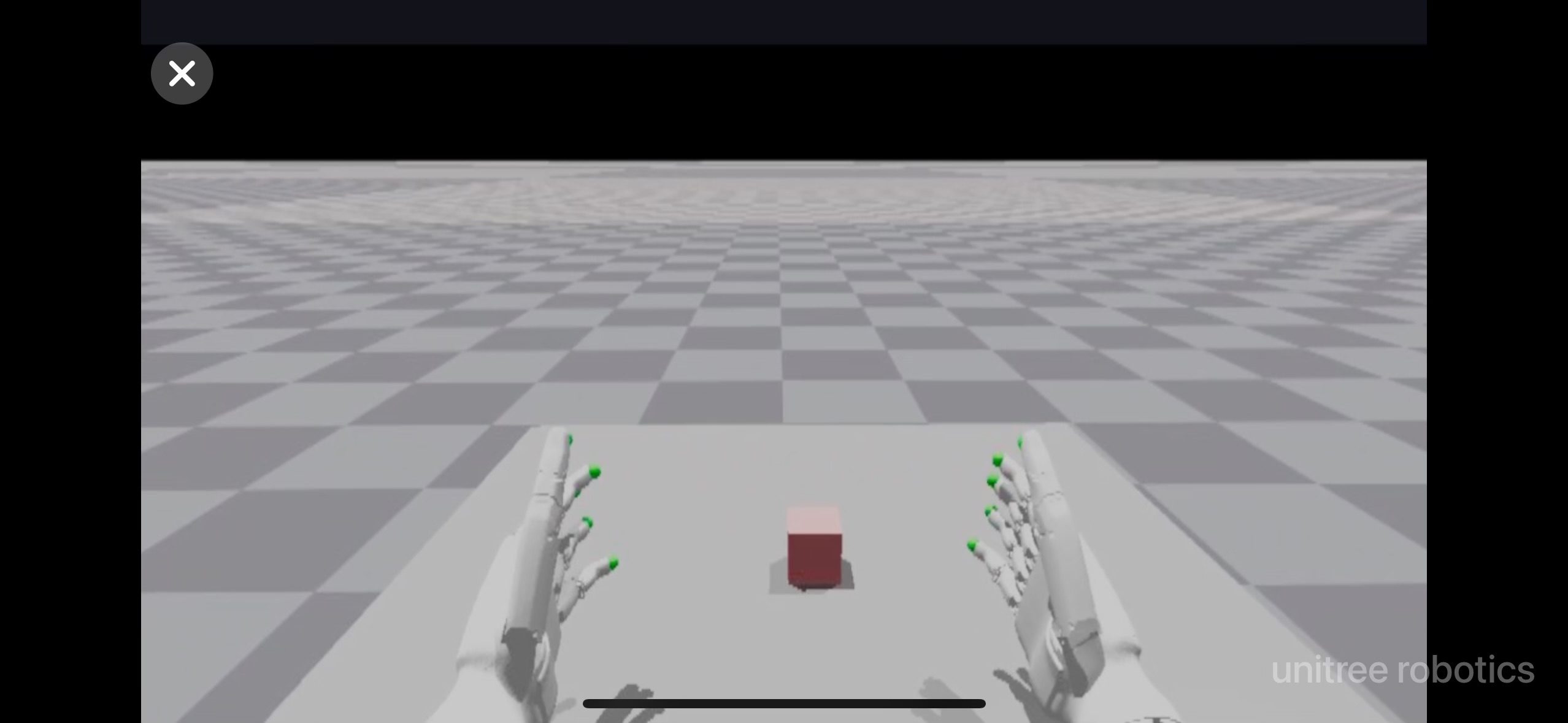
After setup up streaming with local following the above instructions, you can try teleoperating two robot hands in Issac Gym:
cd teleop python teleop_test_gym.py -
Wear your Apple Vision Pro device.
-
Open Safari on Apple Vision Pro and visit: https://192.168.123.2:8012?ws=wss://192.168.123.2:8012
p.s. This IP address should match the IP address of your Host machine.
-
Click
Enter VRandAllowto start the VR session. -
See your hands in 3D!
3. 🚀 Usage
Please read the Official Documentation at least once before starting this program.
3.1 🖼️ Image Server
Copy image_server.py in the avp_teleoperate/teleop/image_server directory to the PC2 of Unitree Robot (G1/H1/H1_2/etc.), and execute the following command in the PC2:
# Now located in Unitree Robot PC2
python image_server.py
# You can see the terminal output as follows:
# Image server has started, waiting for client connections...
# Image Resolution: width is x, height is x
After image service is started, you can use image_client.py in the Host terminal to test whether the communication is successful:
python image_client.py
3.2 ✋ Inspire hands Server (optional)
You can refer to Dexterous Hand Development to configure related environments and compile control programs. First, use this URL to download the dexterous hand control interface program. Copy it to PC of Unitree H1_2.
On Unitree H1_2's PC, execute command:
sudo apt install libboost-all-dev libspdlog-dev
# Build project
cd h1_inspire_service & mkdir build & cd build
cmake .. -DCMAKE_BUILD_TYPE=Release
make
# Terminal 1. Run h1 inspire hand service
sudo ./inspire_hand -s /dev/ttyUSB0
# Terminal 2. Run example
./h1_hand_example
If two hands open and close continuously, it indicates success. Once successful, close the ./h1_hand_example program in Terminal 2.
3.3 🚀 Start
Everyone must keep a safe distance from the robot to prevent any potential danger!
Please make sure to read the Official Documentation at least once before running this program.

It's best to have two operators to run this program, referred to as Operator A and Operator B.
Now, Operator B execute the following command on Host machine :
python teleop_hand_and_arm.py
And then, Operator A
-
Wear your Apple Vision Pro device.
-
Open Safari on Apple Vision Pro and visit : https://192.168.123.2:8012?ws=wss://192.168.123.2:8012
p.s. This IP address should match the IP address of your Host machine.
-
Click
Enter VRandAllowto start the VR session.
When host terminal outputs "Please enter the start signal (enter 'r' to start the subsequent program):", Operator B can start teleoperation program by pressing the r key in the terminal.
At this time, Operator A can remotely control the robot's arms and dexterous hands.
Next, Operator B can press s key to begin recording data in the 'record image' window that opens, and press s again to stop. This can be repeated as necessary.
3.4 🔚 Exit
To exit the program, Operator B can press the q key in the 'record image' window.
To avoid damaging the robot, Operator A need to make sure the robot's arms are in a natural down position before exiting.
4. 🗺️ Codebase Tutorial
avp_teleoperate/
│
├── assets                    [Storage of robot URDF-related files]
│
├── teleop
│   ├── image_server
│   │     ├── image_client.py [Used to receive image data from the robot image server]
│   │     ├── image_server.py [Capture images from cameras and send via network (Running on robot's on-board computer)]
│   │
│   ├── open_television
│   │      ├── television.py    [Using Vuer to capture wrist and hand data from apple vision pro]
│   │      ├── tv_wrapper.py    [Post-processing of captured data]
│   │
│   ├── robot_control
│   │      ├── robot_arm_ik.py        [Inverse kinematics of the arm]
│   │      ├── robot_arm.py           [Control dual arm joints and lock the others]
│   │      ├── robot_hand_inspire.py  [Control inspire hand joints]
│   │      ├── robot_hand_unitree.py  [Control unitree hand joints]
│   │
│   ├── utils
│   │      ├── episode_writer.py          [Used to record data for imitation learning]
│   │      ├── mat_tool.py                [Some small math tools]
│   │      ├── weighted_moving_filter.py  [For filtering joint data]
│   │
│   │──teleop_hand_and_arm.py   [Startup execution code for teleoperation]
|   |——teleop_test_gym.py       [Can be used to verify that the environment is installed correctly]
5. 🙏 Acknowledgement
This code builds upon following open-source code-bases. Please visit the URLs to see the respective LICENSES:
- https://github.com/OpenTeleVision/TeleVision
- https://github.com/dexsuite/dex-retargeting
- https://github.com/vuer-ai/vuer
- https://github.com/stack-of-tasks/pinocchio
- https://github.com/casadi/casadi
- https://github.com/meshcat-dev/meshcat-python
- https://github.com/zeromq/pyzmq
- https://github.com/unitreerobotics/unitree_dds_wrapper
- https://github.com/tonyzhaozh/act
- https://github.com/facebookresearch/detr
- https://github.com/Dingry/BunnyVisionPro